Hailey Device Repair / From the bench

Inside the repair.

A closer look at the parts that keep your everyday devices going.

Pick a part.
See the bigger picture.

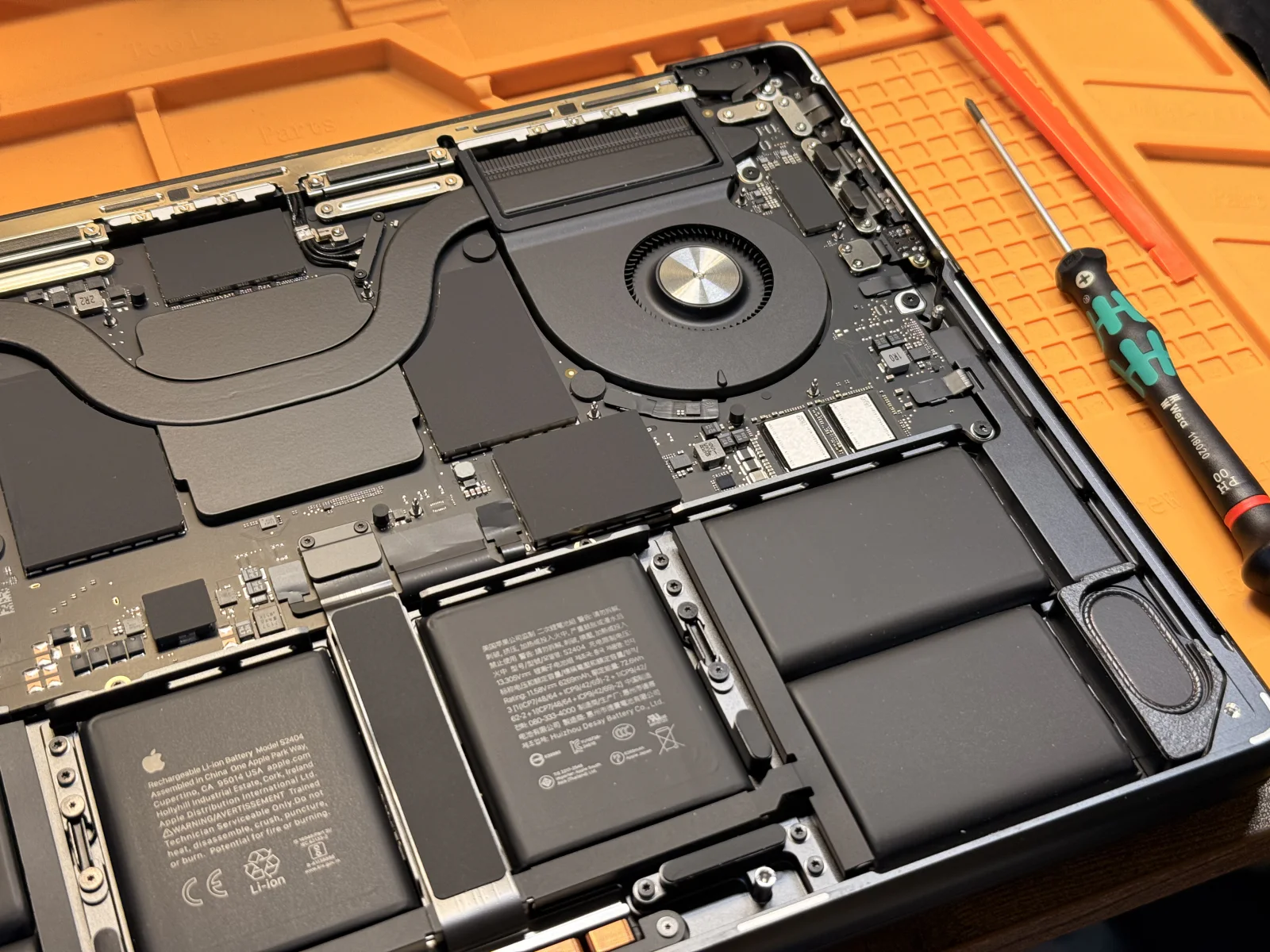
Open MacBook on an orange repair mat, showing its battery cells, cooling fan, logic board, and right speaker.
01 / A laptop, opened up

Stored energy

A lot of the inside is battery.

Those large black sections across the lower half are battery cells. Spreading them across the case makes room for more capacity without making the laptop much thicker.

A closer look

The battery is a separate assembly from the logic board. Reaching it and handling its adhesive carefully are part of the replacement work.

Several cells. One battery assembly.

Moving heat

Small fan. Important job.

The circular blades move air through the cooling system. The fan works with the heat sink to carry heat away from the electronics and out of the case.

A closer look

Cooling is a system: the fan, air path, and contact between the hot components and their cooling hardware all have a role.

Airflow is only one part of cooling.

Connected systems

The connections behind everything.

The logic board connects the computer’s processors, power circuits, and other electronics. The tiny components you can see are only part of that network; copper connections also run inside the board.

A closer look

A board repair works at the level of components and electrical connections. Replacing an entire board is a different kind of job.

A circuit board has more than one layer.

Sound, in a small space

Even the empty space has a job.

The speaker sits along the edge beside the battery. Its shaped enclosure gives sound room to move inside a very thin computer.

A closer look

The enclosure, its mounting points, and the connection to the board all belong to the speaker assembly. Repair involves more than the visible speaker surface.

The enclosure is part of the sound.

01 / 04
Explore MacBook repair
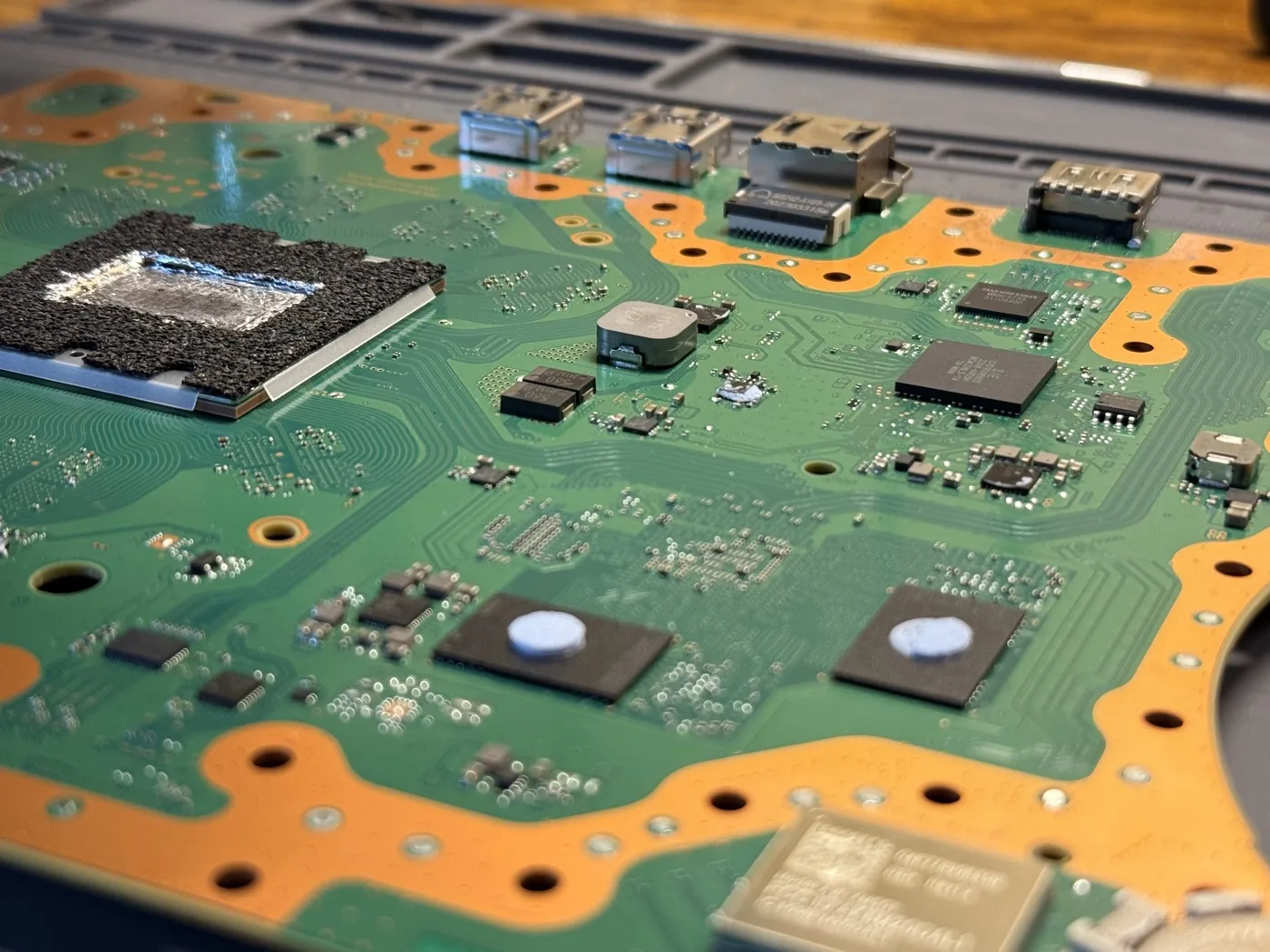
PlayStation 5 motherboard on a repair mat, with the processor at left, rear ports across the top, and fine circuit traces across the board.
02 / A console, down to the board

At the center of play

Where the game comes together.

The large chip at the left combines the console’s main processing and graphics work. In this opened view, the cooling assembly has been removed and the thermal interface is visible.

A closer look

The PS5 uses liquid metal to transfer heat from its processor into the cooling assembly. The surrounding barrier helps contain it.

Processing and graphics share one main chip.

The picture’s way out

One small port. Many connections.

The HDMI port is the metal socket at the far right of the rear connector row. It carries digital picture and sound from the console to a display.

A closer look

This port is soldered to the motherboard. Replacing it means working on its small signal connections as well as the larger joints that hold it in place.

A soldered connector, not a plug-in module.

The hidden network

A city of tiny connections.

Look at the fine lines fanning across the green board. These are circuit traces: copper paths carrying signals between components.

A closer look

The visible paths are only part of a multilayer board. A connection can need attention even when the surrounding parts look intact.

The green surface covers a copper network.

Everyday connections

Built for more than a cable.

The two matching metal sockets at the left of the rear connector row are USB ports. They connect accessories and compatible external storage to the console.

A closer look

A connector needs both an electrical connection and a solid physical attachment. The socket’s metal shell helps support repeated plugging and unplugging.

Mechanical strength matters, too.

01 / 04
Explore PS5 repair

Hardware varies by model. These photos show the devices pictured, with their covers removed.

About this tour

The detail makes the difference

Good repair starts
with understanding.

There’s a lot between a broken device and a working one. This tour gives you a closer look at that world—from a battery assembly to the tiny connections on a circuit board.

For your own device, talk with Samuel. You’ll get an explanation of the work and a quote before it begins.

Talk to the person doing the repair
Hardware references

Component background: Apple’s MacBook Pro repair documentation and Sony’s PS5 teardown. Layouts differ across hardware revisions.